
Key takeaway: Can you sell on Amazon from India?
Yes. If you live in India, you can register on Amazon.in and start selling to Indian customers, usually within a couple of days once your documents are ready. You can also sell to shoppers in the US, UK, UAE and beyond through Amazon Global Selling, without moving abroad or setting up a foreign company. And yes, sellers based outside India can list on Amazon.in too, with the right tax and import paperwork.
Most people reading this want the first one: sell on Amazon.in, here, now, without getting scammed by a supplier or buried by fees. So that's where we'll spend most of our time. The global stuff comes near the end, once you've got the basics handled.
Here's the honest version of what's ahead. The selling part is easy. The bits that trip up new sellers are documents, picking a product that actually has margin after fees, and finding a supplier who won't ghost you. Get those three right and the rest is mostly admin.

First, pick your route
Before you touch a single form, decide which Amazon you're actually selling on. This one choice changes your documents, your costs, and your shipping. The live competitor pages skip it, which is why so many new sellers start filling in the wrong paperwork.
| Route | Best for | Core documents | Difficulty | Where SaleHoo helps |
|---|---|---|---|---|
| Amazon.in (domestic) | Beginners testing a product with low capital | GST (or exempt category), PAN, bank account, pickup address | Lower | Finding a product with margin, vetting a reliable Indian or overseas supplier |
| Amazon Global Selling (export) | Sellers with an export-ready product and a bit more capital | IEC, AD Code, LUT, PAN, GST, US tax interview | Higher | Sourcing export-friendly, "Made in India" products and checking supplier export experience |
| Selling into India from abroad | Overseas sellers targeting Indian shoppers | Indian GST, local tax/import compliance, often a local fulfillment partner | Medium | Vetting suppliers and validating demand before you commit |
If you're not sure, start domestic. It's the cheapest place to make your beginner mistakes, and almost everything you learn on Amazon.in carries straight over to Global Selling later. We'll cover the export route properly in Going global, below.
This guide follows the domestic path step by step. Let's go.
Step 1: Get your documents in order
This is the part everyone wants to skip and nobody can. The good news: the list is short, and you probably have most of it already.
For an Amazon.in seller account you'll need:
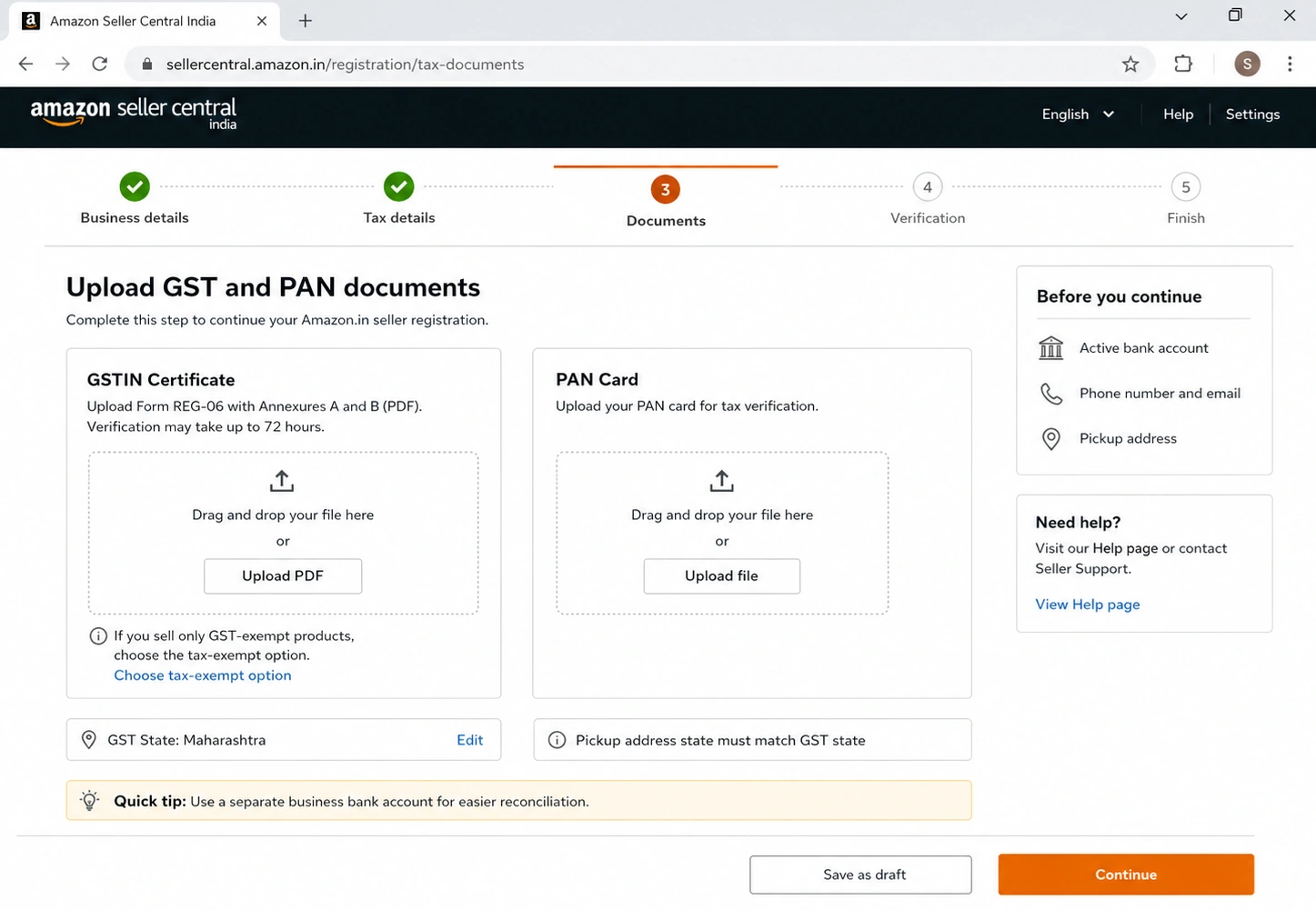
- GST number for most categories. Amazon asks for it during registration and verifies your GSTIN certificate, which can take up to 72 hours. If you only sell genuinely GST-exempt items (books are the classic example), you can select the tax-exempt option and skip it.
- PAN card for tax purposes.
- A bank account in your business or personal name, where Amazon deposits your earnings.
- An active phone number and email for verification.
- A pickup address in the same state as your GST registration, where Amazon (or your courier) collects orders.
A small but real detail most guides gloss over: GST verification and pickup-address state-matching are the two things that quietly stall registrations. Get your GSTIN certificate (Form REG-06 with Annexures A and B) saved as a clean PDF before you start, and make sure your pickup address matches your GST state. That alone saves you a 72-hour back-and-forth.
When does GST become non-negotiable? Once your turnover crosses ₹40 lakh for goods (₹20 lakh in some special-category states), GST registration is mandatory regardless of category. If you're nowhere near that yet and you're in an exempt category, you can start without it, but most sellers register anyway because most categories require it.
Step 2: Work out what it actually costs (and whether you'll make money)
Here's the section the opportunity-cheerleader articles avoid, because it's where dreams meet arithmetic. You don't make money when something sells on Amazon. You make money when something sells for more than it cost you, after every fee. Those are very different numbers.
Amazon India charges a few predictable fees on each sale:
- Referral fee: a percentage of the selling price, typically in the 5% to 20% range depending on category.
- Closing fee: a flat ₹10 to ₹40 per item, based on price and shipping method.
- Fulfillment / weight-handling fee: depends on how you ship. FBA fulfillment often runs ₹30 to ₹150 per item by size and weight; Easy Ship sits lower; self-ship has no Amazon fulfillment charge but you pay your own courier.
Amazon publishes a profit formula worth memorizing: Profit = Selling Price − (Referral Fee + Closing Fee + Weight Handling Fee + Other Applicable Fees + Product Cost). Plug your real numbers into Amazon's revenue calculator before you order anything.
There's also a strong reason to start now rather than later: Amazon has been cutting seller fees hard. As of early 2026, Amazon India announced zero referral fees on over 1.2 crore products priced under ₹300, a reduced national shipping rate of ₹65, and multi-unit order discounts of up to 90% on second-unit fees, with later updates extending zero referral fees to over 12.5 crore products and savings of up to 70% in some categories. New sellers also get the New Seller Incentive program, currently worth up to about ₹41,000 in benefits like ad credits and fulfillment perks.
A worked example so this isn't just theory…
Say you want to sell a four-piece stainless steel kitchen storage set on Amazon.in. Here's a realistic unit P&L:
| Line item | Amount (₹) |
|---|---|
| Selling price (listed) | 799 |
| Product cost from supplier | 260 |
| Inbound + packaging | 25 |
| Referral fee (~15%, kitchen) | 120 |
| Closing fee | 25 |
| Shipping (Easy Ship) | 75 |
| PPC allowance (launch) | 80 |
| Returns + buffer | 40 |
| Total cost | 625 |
| Gross profit / unit | 174 |
| Margin before overhead | ~22% |
Two lessons jump out, and they're the ones that separate sellers who last from sellers who quietly quit. First, PPC and returns are real costs, not afterthoughts, and beginners almost always under-budget both. Second, a ₹799 product at 22% margin only works if you can keep returns low and ad spend disciplined. Cheap, fragile, or heavy products fail this test fast. Which is exactly why the next step matters more than any other.
Step 3: Pick a product that can actually work
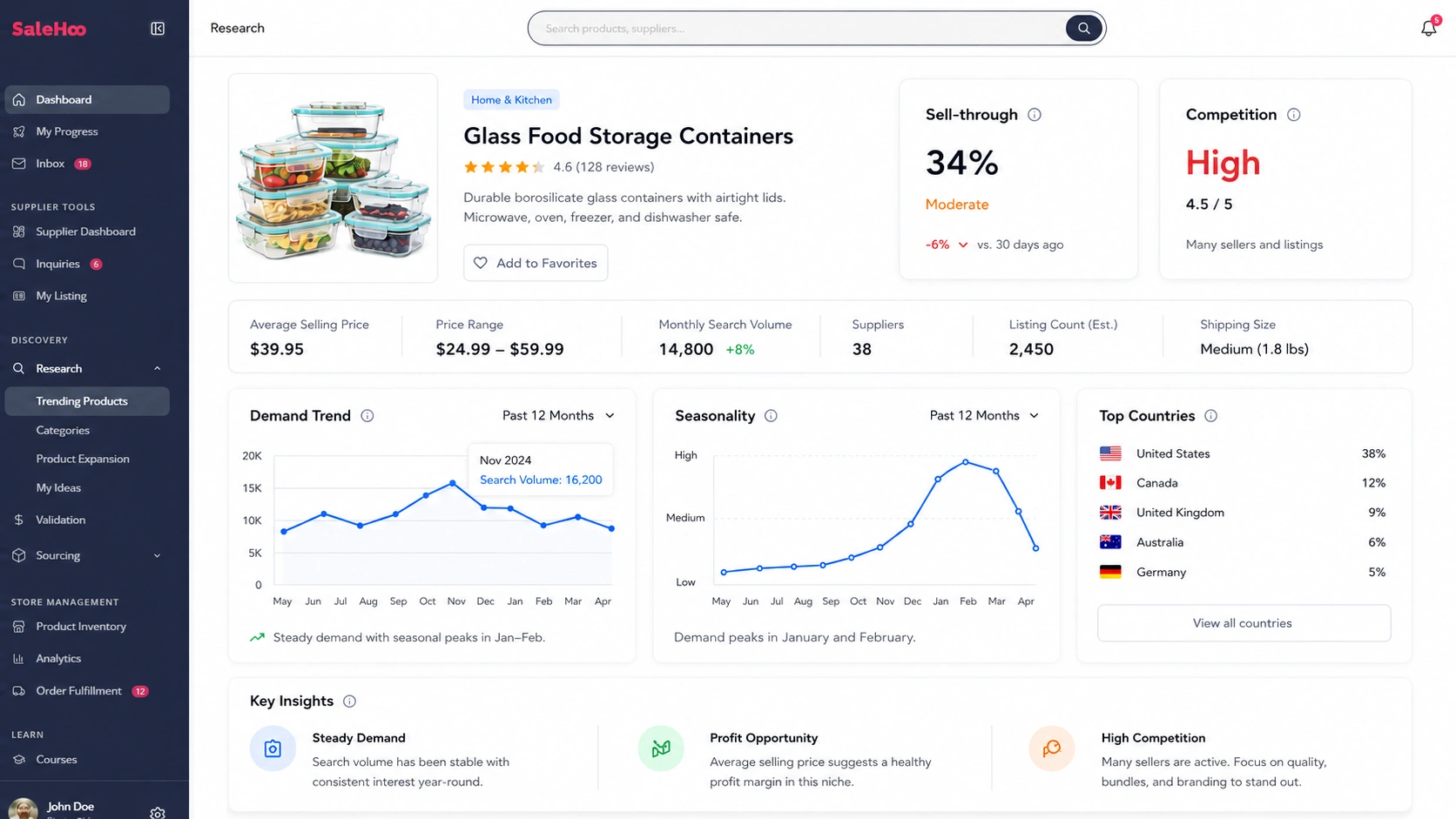
Most people pick a product they personally like and hope. Don't. Pick on data, then sanity-check with your gut. This is where SaleHoo earns its keep, because the difference between a winner and a money pit is usually visible before you order, if you know what to look at.
Run every idea through these filters:
- Price: roughly ₹400 to ₹2,000 for a first product. Cheap enough to be an impulse buy, dear enough to survive fees.
- Weight and size: light and compact. Heavy or bulky kills you on shipping and FBA fees.
- Not fragile: breakage means returns, and returns murder thin margins.
- Steady demand, not a fad: look for a flat or rising trend over the last 3 to 6 months, not a one-month spike.
- Beatable competition: avoid listings dominated by huge brands or by Amazon itself, where you simply can't win the Buy Box.
- Compliance-light: stay away from anything that needs heavy certification (more on that next).
SaleHoo Market Insights is built for exactly this: it surfaces sell-through rates and competition levels across more than a million products, so you're choosing on demand and margin signals instead of vibes. If you'd rather start from a shortlist, our guide to finding profitable products walks through the research workflow end to end.
Categories that tend to work for Indian sellers
Home and kitchen, textiles and home furnishings, apparel basics, beauty and personal-care accessories, handmade and craft goods, yoga and wellness accessories, kitchen storage, and lightweight decor. India's manufacturing base gives you a genuine sourcing advantage in several of these, especially textiles, jute and cotton goods, and handmade items. (Hold that thought, it becomes a superpower in the export section.)
Products to avoid as a new seller
Nobody else in the search results will tell you this plainly, so we will. Skip, at least to start: heavy or bulky items, anything fragile, very low-ticket products where shipping eats the margin, electronics that need UL or safety certification, food and supplements, cosmetics and skincare formulations (versus accessories), branded or resale products without authorization, and seasonal products that leave you holding dead stock. None of these are "never." They're just bad first products, because each one adds a way to lose money before you've learned the platform.
Step 4: Find a supplier you can actually trust
A great product with a bad supplier is a slow-motion disaster. Late stock, quality drift, a rep who stops replying the week your reviews depend on it. As SaleHoo founder Simon Slade puts it, "you rely on your supplier to keep your business operational", and the data backs the stakes: roughly 89% of shoppers will stop buying from a store after one bad experience.
You've got four realistic sourcing models: buy wholesale to resell, work with a manufacturer for private label, partner with Indian artisans for handmade goods, or (carefully, and within Amazon's policy) dropship. Each suits a different budget and ambition. Our supplier-finding guide breaks down which fits which.
I tested this: vetting a supplier in under an hour
Here's the exact check I run before I'll send anyone money, built from years of doing it the hard way:
- Search their name plus "scam," "fraud," or "ripoff." If other sellers got burned, they usually said so online. Two minutes, often decisive.
- Drop their address into Google Street View. Is it a real warehouse or office, or a vacant lot? A mismatch isn't always fatal, but it's a question worth asking them directly.
- Call during business hours. A supplier you can actually reach on the phone is worth ten who only exist over chat. If the line's dead or the person sounds off, slow down.
- Ask the boring questions in writing: minimum order quantity, lead time, what happens with defects, and whether they've shipped to Amazon sellers (or exported) before. Vague answers are an answer.
- Order a sample. Always. Before any bulk order, hold the product in your hands. Photograph it. Check it against what the listing photos promised. This single step prevents most quality disasters.
In my experience, lead times are the detail beginners underestimate most. The quote says one thing; the first real production run says another. Build a buffer into your launch timeline so a slow first batch doesn't blow your whole plan.
Step 5: Register your seller account
Now the easy part. Go to sell.amazon.in and click Start Selling. If you already shop on Amazon, you can use the same login and verify via OTP; otherwise create an account. Then you'll work through: your business or GST-registered name, GST number and certificate upload, store name, pickup address, shipping method, bank details, and your default tax (Product Tax Code).
Once you've added at least one product listing, your store can go live. Verification usually takes a couple of days.
The rejections that waste people's time are predictable: a GST state that doesn't match the pickup address, a blurry or wrong document upload, or a mismatch between your registered name and your bank account name. Fix those before you submit and you'll likely sail through. For the deeper platform mechanics, our how to sell on Amazon guide and the Amazon learning hub have you covered.
Step 6: Build a listing that ranks and converts
A live listing isn't the goal. A listing that shows up and makes people click "buy" is. This matters more than most beginners realize: on Amazon, the first organic result captures the lion's share of sales, and everything below the fold fights for scraps. A product on the first page can grab 70 to 80% of sales, while a fourth-place product grabs only 0 to 10%.
The fundamentals, following Amazon.in's own rules:
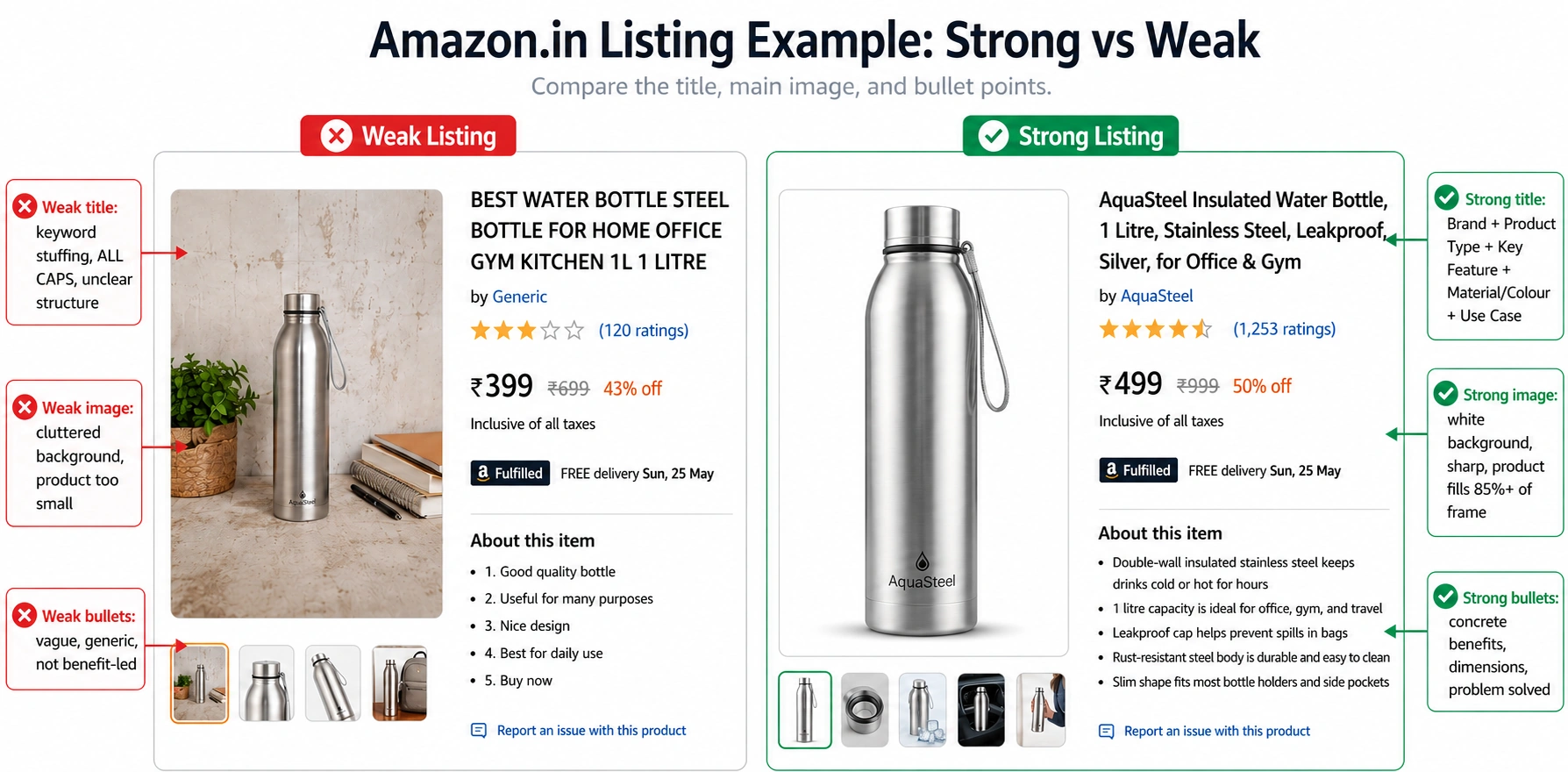
- Title: up to 200 characters. Logical order works best, roughly Brand + Product Type + Key Feature + Material/Colour + Use Case. No ALL CAPS, no "Best" or "Cheapest," and don't repeat a keyword more than twice.
- Images: at least 1,000px on the longest side (1,600px is better), pure white background on the main image, product filling at least 85% of the frame. Use the other slots for angles, close-ups, a size or scale shot, and one lifestyle image showing it in use.
- Bullets (About this item): up to five, each highlighting one concrete benefit (material, dimensions, care, what problem it solves). Customer-focused, not spec-dump.
- Description / A+ Content: short paragraphs, your brand story, and absolutely no "world's best" claims you can't back up.
- Backend search terms: fill the hidden keyword field with the words shoppers actually type, including synonyms that don't fit your title.
The shortcut nobody tells beginners: mine your competitors' reviews. The phrases customers use to praise (or complain about) rival products are the exact words to put in your bullets and the exact gaps to design around. For the search side, our Amazon SEO guide covers ranking factors in depth.
Step 7: Choose how you'll ship (Self-Ship, Easy Ship, or FBA)
Three options, and the right one depends on your stage, not on which is "best."
| Method | You handle | Amazon handles | Best for |
|---|---|---|---|
| Self-Ship | Storage, packing, shipping (your courier) | Nothing | Sellers with their own logistics or local same-day delivery (think kirana-style local reach) |
| Easy Ship | Storage and packing | Pickup and delivery | Beginners who want hassle-free delivery without warehousing, and COD support, which still matters across India |
| FBA | Sending stock in | Storage, packing, shipping, returns, customer service | Higher-volume sellers who want the Prime badge and a hands-off operation |
A sensible path for most beginners: start on Easy Ship to keep costs and complexity low, prove the product sells, then move your proven winners into FBA for the Prime badge and faster delivery. You don't have to pick forever on day one. If you're weighing FBA against running it yourself, our FBA vs dropshipping comparison lays out the trade-offs.
One thing FBA quietly buys you: orders fulfilled through FBA automatically get Amazon's 24/7 customer service and faster returns handling, which can lift your seller rating. That's worth real money once reviews start driving your rank.
Step 8: Get paid, and stay on the right side of the rules
Money first. Amazon India runs on a roughly weekly payout cycle: the first settlement lands within about 14 days, and after that you're typically paid every 7 days. Plan your cash flow around that gap, especially when you're reordering stock while waiting on a payout.
Then tax, briefly and without the panic. Beyond GST, Amazon deducts 1% TDS (Tax Deducted at Source) on your sales once your annual sales on the platform cross ₹5 lakh; that shows up in your Form 26AS and you reconcile it when you file. You'll also file GST returns on a monthly or quarterly cadence depending on your scheme. None of this is hard, but it's the kind of thing worth handling with an accountant once you're trading seriously rather than improvising at year-end.
Returns are part of the deal, not a sign you're failing. Amazon expects prompt handling, and a high return-dissatisfaction rate dents your account health. Budget for returns in your unit economics (we did, back in Step 2), respond fast, and treat refund speed as a reputation lever. To keep your account healthy overall, our guide on avoiding account suspension is worth a read before you scale.
Step 9: Launch and promote (your first 90 days)
A product nobody can find doesn't sell, however good it is. Here's a realistic launch arc instead of a vague "run some ads."
- Weeks 1 to 2: account live, first listing built and polished, sample approved, initial stock inbound. Don't rush the listing to save two days; it's the asset everything else feeds.
- Weeks 3 to 4: go live. Start auto PPC campaigns to discover which keywords actually convert, before you spend a rupee on manual targeting. Consider a launch coupon to nudge early sales velocity.
- Weeks 5 to 8: shift the winning keywords from auto into manual campaigns so you control targeting and budget. Start generating reviews the legitimate way (Amazon's Request a Review), and never the fake way, which gets accounts killed.
- Weeks 9 to 12: optimize the listing using real search-term data, double down on what's converting, and make your first reorder decision based on sell-through, not hope.
Time your bigger pushes around India's selling events. The Great Indian Festival, Prime Day, Diwali and similar windows bring a surge of traffic, and sellers who stock up and start ads before the rush win the most. Our Amazon PPC guide goes deep on campaign structure once you're ready to scale spend.
Metrics to watch before you reorder
Don't fly blind, and don't drown in dashboards either. Before you commit cash to a second order, watch these: sessions (traffic), conversion rate, ACoS and TACoS (ad efficiency), Buy Box percentage, keyword rank for your main terms, review count and rating, return rate, and contribution margin per unit. If conversion is healthy and contribution margin is positive after ads and returns, reorder. If not, fix the listing or the price before you buy more stock.
This is a discipline, not a one-off. Simon learned it the hard way building SaleHoo: "we didn't track metrics in the very beginning, but now we track and measure key statistics on a daily basis". The sellers who last are the ones who let the numbers, not their feelings, decide the reorder.
Going global: Amazon Global Selling from India
Ready to think bigger? This is where being an Indian seller stops being a constraint and starts being an edge.
Through Amazon Global Selling, you can sell to customers across 18+ marketplaces (the US, UK, Germany, Canada, UAE, Saudi Arabia and more) without leaving home, and usually without setting up a foreign company to start. The momentum is real: as of October 2025, Amazon crossed $20 billion in cumulative e-commerce exports from India through Global Selling, ahead of its target, with the program now including more than 2 lakh Indian exporters and over 75 crore "Made in India" products shipped worldwide. Amazon's now targeting $80 billion in cumulative exports by 2030.
The "Made in India" advantage is the whole point. Textiles, jute and cotton goods, Ayurveda and wellness products, handmade crafts: categories where you're sourcing locally and competitors abroad can't easily match you. Take Sarvesh Agarwal, founder of HomeMonde, who used Global Selling to reach eco-conscious buyers overseas with sustainable jute rugs made in India. As he put it, "we've been able to study market trends, reach global customers, and manage logistics smoothly". That's a sourcing story as much as a selling story, which is exactly where SaleHoo's product-research and supplier-vetting tools come in.
The export route does add paperwork (an IEC, AD Code and LUT among them) and a US tax interview if you're selling into America. Amazon has built tools like SEND for cross-border logistics and an Exports Compliance Dashboard to simplify the documents. It's more involved than Amazon.in, but it's far from impossible, and the per-order margins on the right products can be considerably higher.
If exporting is your real goal, start domestic to learn the platform, then plan the cross-border move deliberately. Our guide to importing and sourcing from India and our global shipping guide are good next reads.
Your Amazon India launch checklist
Getting started (domestic):
- GST sorted (or confirmed exempt category) and GSTIN certificate saved as PDF
- PAN, business bank account, phone, email ready
- Pickup address matches GST state
- Route chosen: Amazon.in to start
- Product idea run through the Step 3 filters
- 3 to 5 suppliers vetted, sample ordered
- Unit P&L built with real category fees (positive after PPC and returns)
- Seller account registered and verified
- First listing built: title, 5 bullets, white-background images, A+ content, backend keywords
- Fulfillment chosen (Easy Ship to start)
- Auto PPC live, launch coupon decided
- Metrics dashboard set up before reorder
When you're ready to go global:
- IEC, AD Code, LUT in progress
- US tax interview completed (if selling into the US)
- Export-friendly product and supplier confirmed
- Cross-border fulfillment plan (SEND or FBA export)
FAQ: Selling on Amazon India
Only if you sell exclusively in a genuinely GST-exempt category (like books). Most categories require a GST number, and once your turnover crosses the threshold (₹40 lakh for goods, ₹20 lakh in some states), GST is mandatory regardless.
Less than people think. Many sellers start with stock for a single product plus a small PPC budget. The real cost is your first inventory order plus an ad allowance, not a big fixed fee. Build your unit P&L (Step 2) before you commit.
Creating a seller account is free. You pay per sale through referral, closing and fulfillment fees, plus any ads you run.
Start on Easy Ship for low hassle and COD support, prove the product, then move winners to FBA for the Prime badge. Self-Ship suits sellers with their own delivery setup.
Heavy, fragile, very cheap, or compliance-heavy items: electronics needing certification, food, supplements, cosmetics formulations, and branded products without authorization.
On average, a meaningful share of new Amazon India sellers see their first sale within about four weeks of going live, assuming a researched product and a decent listing.
Roughly weekly. The first settlement lands within about 14 days, then every 7 days after that.
Yes, 1% TDS once your annual platform sales cross ₹5 lakh, reconciled when you file. GST applies separately.
You're expected to handle them promptly; FBA handles returns for you. Budget for returns in your margins and keep refund times short to protect account health.
Yes, through Amazon Global Selling, with valid business documents and compliance with India's GST and import rules, often via a local fulfillment partner.
You can start as a sole proprietor. Registering as an LLP or private limited company adds cost but gives you more flexibility and tax options as you scale. Talk to an accountant before over-engineering this.
No. An IEC (Import Export Code) is for exporting via Global Selling or importing stock from abroad, not for domestic Amazon.in selling.
Picking a product on emotion and skipping the fee math. The product decision, made on data, drives almost everything else.
About this article
About the author