
Key takeaways
- Pinterest is a visual search engine, not a social feed. People go there to plan and buy, which is exactly the mindset you want.
- It works best for products people shop with their eyes: fashion, home, beauty, gifts, weddings, food, pets. It's a weak fit for commodity electronics and urgent-need buys.
- The order that wins: pick a Pinterest-friendly product, research keywords, build intent-based boards, make pins that earn clicks, send each click to a matched page, then track outbound clicks and revenue.
- Organic Pinterest is slow and compounding. A pin you post today can still pull traffic next year. Ads amplify proven pins; they don't replace the work.
- Most stores quit at week three, right before the channel starts paying. Give it a season.
Pinterest gets written off as a place for recipe screenshots and dream kitchens. That read is years out of date, and it's leaving money on the table for product sellers.
Here's the version that matters for your store. In Q1 2026, Pinterest hit an all-time high of 631 million monthly active users, up 11% year over year, its tenth straight quarter of double-digit growth. More telling for sellers: the platform now handles more than 80 billion searches a month, and roughly half of them are commercial. People show up already deciding what to buy. Your job is to be the pin they save.
This isn't a "why Pinterest is great" article. It's the playbook: how to choose products Pinterest actually rewards, set the channel up properly, get pins found in search, and turn saves into sales. Let's get into it.

Is Pinterest worth it for ecommerce in 2026?
Short answer: if you sell something people plan and buy visually, yes. If you sell undifferentiated phone chargers on price, probably not. The honest version has nuance, so let's do the nuance.
Three things make Pinterest different from the rest of your marketing mix.
First, intent. An Instagram scroll is for catching up with people. A Pinterest search is for finding a thing to do or buy. When someone types "small kitchen organization" or "boho nursery ideas," they're shopping, even if they don't have a card out yet. That's why a single product can keep selling for months after you've forgotten you pinned it.
Second, shelf life. A tweet dies in minutes. An Instagram post fades from the feed in a day or two. A well-optimized pin gets indexed and keeps resurfacing in search and the home feed for months, sometimes years. So your effort compounds instead of evaporating. This is the part most people miss: Pinterest pays you back slowly, then all at once.
Third, the unbranded search behavior. Most Pinterest searches don't include a brand name, which means a new store can rank for "linen summer dress" without anyone having heard of it yet. Try winning "linen summer dress" on Google against twenty established brands and a few marketplaces. Pinterest is friendlier ground for the little guy.
Where does it sit in the buyer journey? Earlier than Google Shopping, later than a cold Instagram ad. People are forming intent: building a wedding board, planning a room, hunting for a gift. That timing is a gift and a catch. You're reaching buyers before they're ready to check out, so the channel rewards patience and punishes anyone expecting instant sales.
And no, it isn't instant. We'll set realistic timelines later in the piece. For now, know that Pinterest is a compounding asset, not a faucet.
Is Pinterest right for your store?
This is the section most Pinterest guides skip, and it's the one that saves you the most wasted effort. Not every product belongs here.
Pinterest is a visual planning engine. The products that thrive are the ones people style, gift, collect, or daydream about. The ones that struggle are bought fast, on price, with no aspirational angle.
| Strong fit | Weak fit |
|---|---|
| Fashion, jewelry, accessories | Commodity electronics and cables |
| Home decor, furniture, kitchen | Urgent-need replacements (a part that broke today) |
| Beauty, skincare, makeup | Products bought purely on lowest price |
| Gifts, weddings, party supplies | Heavily technical B2B gear that needs a sales call |
| Food, recipes, kitchen tools | Items with no "in use" or styled photo |
| Baby, parenting, pets | Anything you can't make look good in a photo |
| Fitness, wellness, crafts, DIY | Low-margin products that can't fund the slow build |
A quick gut check: can you photograph the product in a real setting (on a person, in a room, on a table) in a way that makes someone want that life? If yes, Pinterest is worth your time. If the only photo that exists is the product on a white background, you've got more work to do before you pin.
This is where SaleHoo sellers have an edge. Most people pick a product, then wonder if it'll work on Pinterest. Smarter sellers run it the other way: they look for products that are visual, giftable, and trend-aware first, then validate real demand before sourcing a single unit. SaleHoo's CEO and co-founder Simon Slade has made the same point in his 2026 writing, that visual products need Pinterest, and that branding is what separates the winners from the hundreds of stores selling the identical dropshipped item.
So before you commit, validate. Run the idea through a real product-research process: check actual demand, see who's already advertising it, confirm marketplace traction, and make sure you can source it with a margin that survives shipping and returns. We walk through that exact workflow in how to find products that actually sell, and SaleHoo Market Insights gives you sell-rate, competition, and pricing data so steps one through three happen in one place instead of five browser tabs. If a product is visual, in demand, and sourceable from a vetted supplier, you've got a Pinterest candidate. Worth a look too: underrated niches and the surprisingly large wedding category, which is one of Pinterest's biggest planning behaviors.
The 6-part Pinterest traffic system
Most Pinterest advice is a pile of tips. Tips don't compound; systems do. Here's the order that actually builds traffic, and the rest of this article is just each part in detail.
- Pick a Pinterest-friendly product. Visual, searchable, giftable, sourceable, profitable. (You just did this above.)
- Research buyer-intent keywords. Find the exact phrases your shopper types, before you design anything.
- Build boards around intent. Boards are search categories, not decoration. Name them the way people search.
- Create multiple pin angles per product. One product, several pins: benefit, gift, how-to, comparison.
- Send every click to a matched page. A great pin pointed at your homepage wastes the click.
- Track outbound clicks and revenue, then scale winners. Double down on what sells. Add pins or ads to your proven angles.
Keep this order. Sellers who jump to "make pretty pins" before keywords and boards end up with beautiful content nobody can find. We see it constantly.
Set up your Pinterest foundation
Setup matters, but it's plumbing, so we'll keep it tight. Knock out these six things in an afternoon and you're done.
- Get a Pinterest Business account (or convert your personal one). It unlocks analytics, Rich Pins, and ads. Free.
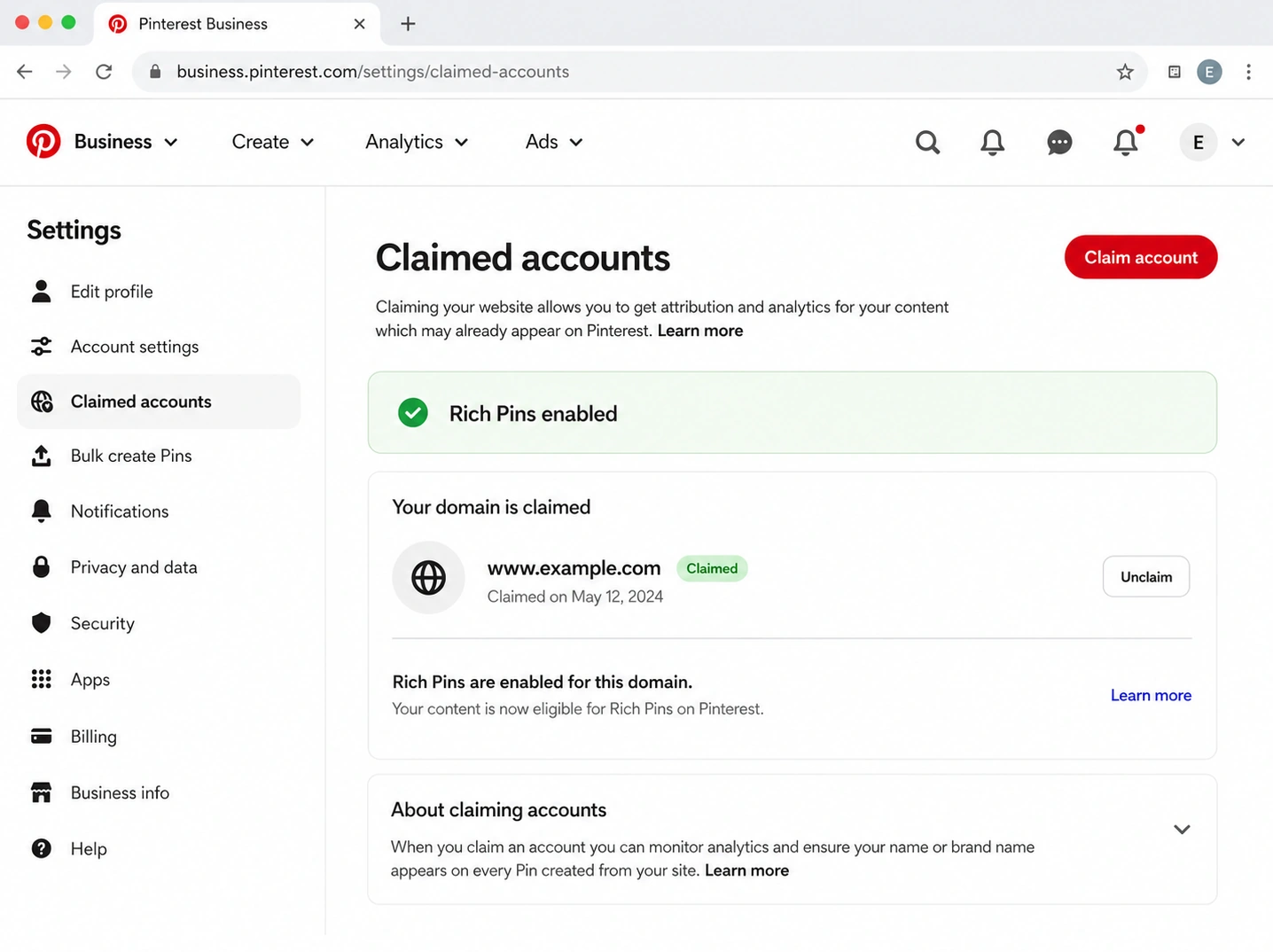
- Claim your website. Add Pinterest's meta tag or HTML snippet to your store. Shopify can often do it through the Pinterest app automatically. Claiming ties your pins to your domain and earns you trust signals.
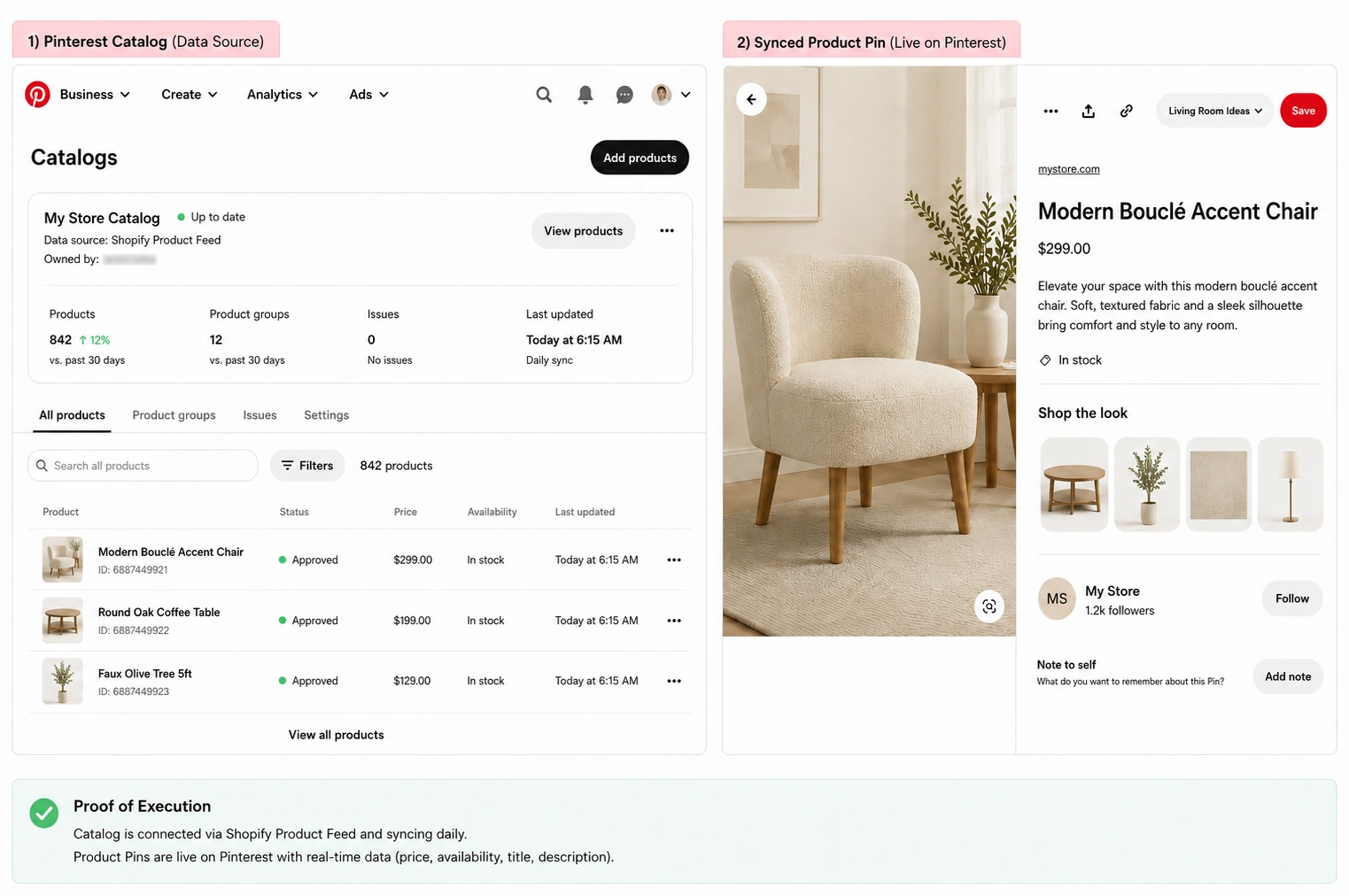
- Connect your catalog. Shopify, WooCommerce, and BigCommerce all support product feeds. This turns your products into Product Pins that link straight to your store and update as inventory changes.
- Enable Rich Pins. They pull live price and availability from your product pages. (Full walkthrough below, because this is where people get stuck.)
- Turn on the Pinterest tag. It tracks outbound clicks and conversions. Without it, you're flying blind on what's actually selling.
- Optimize the profile. Brand name plus a keyword in your display name ("EcoLiving Co, Sustainable Kitchen"), a one-line bio that names who you help, a clean logo, and a few core boards to start.
That's the foundation. Don't gold-plate it. Get it functional and move on to the part that drives traffic: keywords.
Pinterest keyword research for ecommerce
Pinterest decides who sees your pin by reading the words in your pin title, description, and board name, the same way Google reads a page. Pretty pictures with no keywords are invisible. So research comes before design. Always.
Here's the workflow that works.
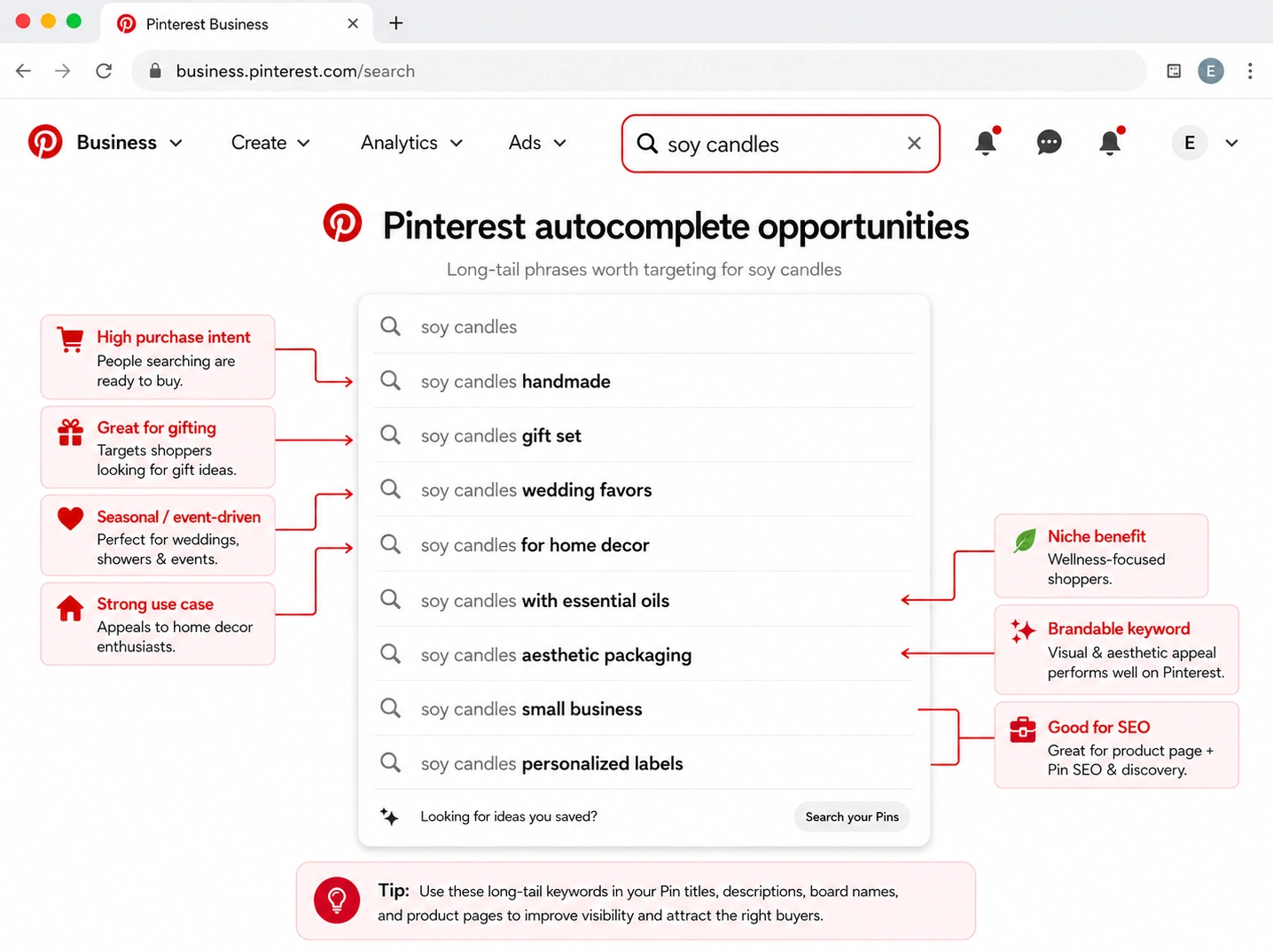
Mine the search bar. Type your product category into Pinterest's search and write down every autocomplete suggestion. Those are real searches with real volume, in your shoppers' exact words. Type "candle" and you'll get "candle making," "candle aesthetic," "soy candles," "candle shelf decor." Each one is a different buyer.
Read the guided search tiles. After you search, Pinterest shows colored keyword tiles across the top. Click them to go deeper and collect long-tail phrases ("soy candles for living room," "non-toxic candles for bedroom").
Use Pinterest Trends. It shows what's rising and when, which is gold for seasonal products. Searches for "gift ideas" climb in October. "Wedding guest dress" peaks in spring. Plan pins six to ten weeks ahead of the curve.
Collect modifiers. For any product, you can multiply keywords by attaching: material, style, room or use case, recipient, occasion, problem solved, season, and budget. "Bamboo (material) baby bowls (product) for baby-led weaning (use case)" is three keywords in one phrase.
Then map it. Here's a worked example you can copy.
Product: bamboo baby feeding bowls
Primary keyword: bamboo baby bowls
Secondary keywords: non-toxic baby feeding, baby-led weaning supplies, eco baby gifts
Boards: "Baby-Led Weaning Ideas," "Non-Toxic Baby Products," "Baby Shower Gift Ideas"
Pin title: Bamboo Baby Bowls for Non-Toxic Baby-Led Weaning
Pin description: Safe, plastic-free bamboo bowls built for messy first meals. Suction base, easy clean, perfect baby-shower gift.
Destination: the product page, or an "eco baby feeding essentials" collection page
One product, three boards, a dozen searchable phrases. That's how a single item shows up for a dozen different shoppers instead of one.
Build boards around buyer intent
Boards are not folders for tidiness. They tell Pinterest's algorithm what topics you're an authority on, and they're searchable surfaces in their own right. Named well, they pull traffic. Named lazily, they confuse the algorithm and bury your pins.
There's a real before-and-after here. A Dubai home decor store ran boards called "Products We Love," "Inspiration," and "Sales." Pinterest couldn't tell what they were about, so it showed their pins to almost nobody. They renamed the boards around how people search ("Modern Minimalist Living Room Ideas," "Small Apartment Storage," "Cozy Bedroom Decor"), and monthly profile visits climbed from 800 to 12,000 in four months. Same products. The algorithm just finally understood them.
Build these board types around your products:
- Product category boards: "Minimalist Jewelry," "Reusable Kitchen Products"
- Style and aesthetic boards: "Boho Bedroom Decor," "Quiet Luxury Outfits"
- Occasion and gift boards: "Gifts for New Moms," "Holiday Hosting Essentials"
- Problem and solution boards: "Small Kitchen Organization," "Non-Toxic Home Swaps"
- Seasonal boards: "Back to School Lunch Ideas," "Christmas Gift Guide"
- Buyer persona boards: "Gifts for Dog Lovers," "Fitness Gear for Beginners"
Aim for clear, keyword-led board names and at least 20 to 30 pins per board, mixing your own products with genuinely useful curated content so each board reads like a real resource, not a billboard. A board called "Our Favorites" tells Pinterest nothing. "Small Kitchen Organization" tells it everything.
Create pins that earn clicks
Now the design. The rules are simple, and breaking them quietly kills your reach.
Start vertical, always: a 2:3 ratio at 1000 x 1500 pixels. Horizontal pins shrink in the feed and lose. Show the product in context (a candle on a styled shelf, an outfit on a person, a bowl on a real high chair) rather than floating on white. Add a short text overlay that states the benefit, because most people decide whether to click in about a second and the overlay is what tells them what they're looking at. Keep your logo small. A logo eating 30% of the image just shrinks the part that sells.
Then write a keyword-rich description with a soft call to action ("Tap to shop," "See the full collection"), and link directly to a matched page, never the homepage.
The move that separates good accounts from quiet ones: create several pin angles for the same product. One candle becomes five pins.
- Benefit pin: "Soy Candles That Burn 80 Hours"
- Problem-solution pin: "Tiny Apartment? These Candles Make It Feel Like Home"
- Gift guide pin: "15 Cozy Gifts for Homebodies Under $40"
- How-to pin: "How to Style a Candle Shelf 5 Ways"
- Comparison pin: "Soy vs Paraffin Candles: What's Actually Better"
- Seasonal pin: "Fall Candles for Sweater Weather"
Here's a real example of why this works, and it's almost embarrassing how simple it is. A home decor store had pins titled "Products We Love" with lovely photos. Monthly clicks: 12. They retitled the same images "Modern Minimalist Living Room Ideas for Small Apartments" with keyword-rich descriptions. Monthly clicks: 340. Identical photos. The words did the work.
A couple of copy templates to steal:
Title: [Benefit or use case] + [product] + [for whom / when]
"Stackable Storage Bins for Small Pantries"
Description: [What it is] + [the problem it solves] + [keyword] + [soft CTA]
"Clear stackable bins that turn a chaotic pantry into something you're proud to open. Perfect for small kitchens. Tap to shop the set."
For design and branding direction across your pins, keep a consistent palette and font so your content is recognizable in a crowded feed.
Product Pins, Rich Pins, and catalogs (I set this up myself)
This is the section nobody enjoys and everybody needs, so I'm going to walk you through it the way it actually went, mess included.
Rich Pins pull live data (price, availability, current title) straight from your product pages onto the pin. Product Pins go a step further and link directly into your store with that data attached. They matter because a pin showing the real price and an "in stock" status earns far more click confidence than a plain photo. Shoppers trust what they can verify.
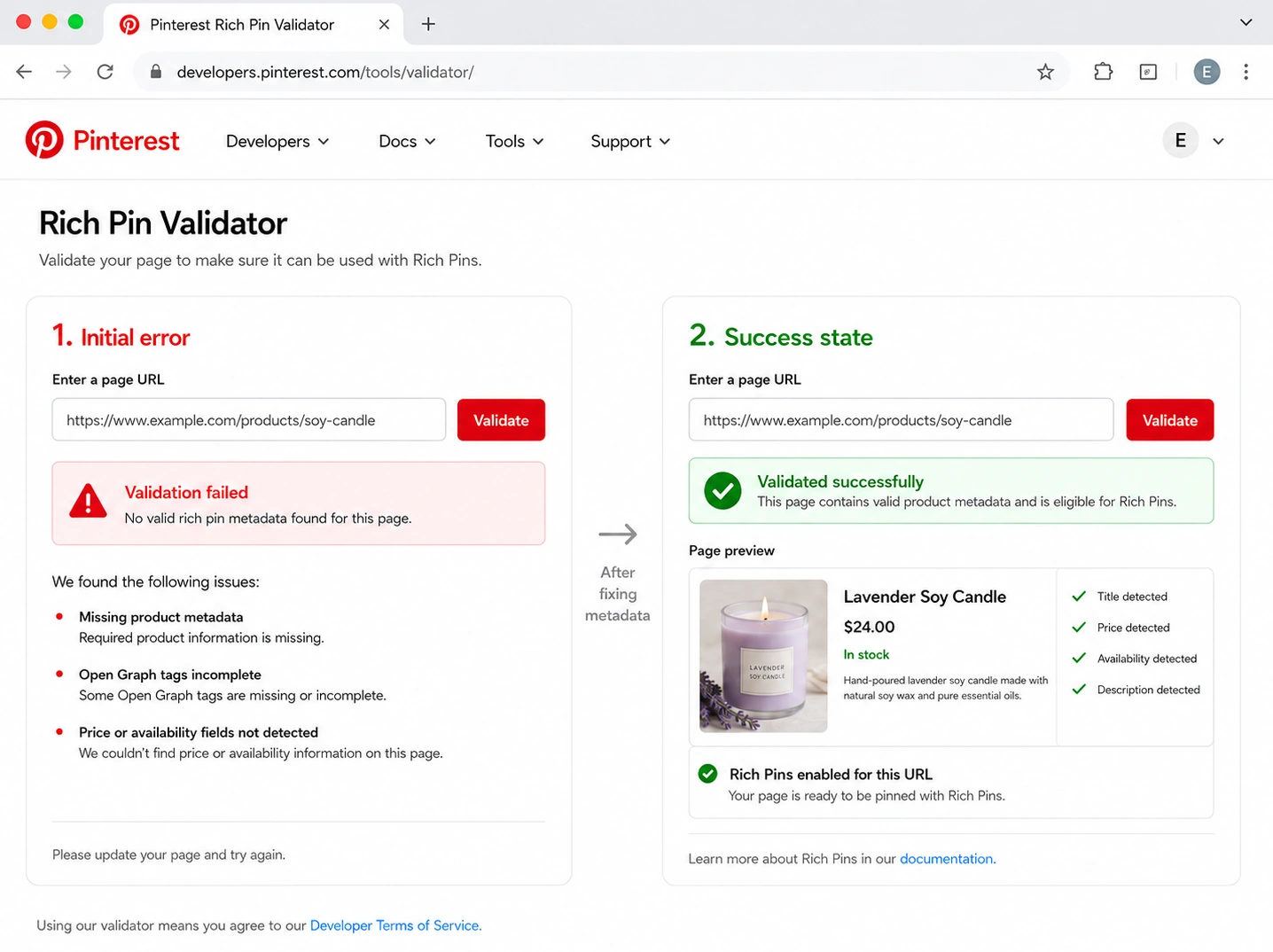
Setting them up sounds like a two-minute job. It usually isn't on the first try. When I enabled Rich Pins on a test Shopify store, the first run through Pinterest's Rich Pin Validator failed because the product page was missing the right Open Graph product tags. It took a couple of attempts and a small tweak to the theme before it passed, and approval landed roughly a day and a half later, not instantly.
Nothing hard. Just fiddly, and worth knowing so you don't think you broke something.
The setup, in order:
- Make sure your product pages output product metadata (Open Graph or Schema). Most Shopify themes do this out of the box; some need an app.
- Run one product URL through Pinterest's Rich Pin Validator and fix any errors it flags.
- Once it passes, every future product pin inherits the live data automatically. No per-pin work.
- For Product Pins at scale, connect your full catalog so your whole store becomes shoppable and stays in sync with inventory.
The boring stuff that trips people up: if your prices or stock are wrong on your product pages, they'll be wrong on your pins, so fix the source first. And if a product sells out, a synced catalog updates the pin for you, which beats manually hunting down dead links.
Turn Pinterest clicks into sales
A click is not a sale. This is where most stores leak, and where the current advice usually goes quiet. So let's be specific.
The core rule: match the pin's promise to the page it lands on. If the pin says "15 Gifts for Coffee Lovers," don't drop people on your homepage to fend for themselves. Send them to a gift collection page where every promise on the pin is right there.
Match by intent:
- Purchase-ready pins (a specific product) go to that product page.
- Broad discovery pins ("minimalist kitchen ideas") go to a collection or category page, so browsers can wander and find their thing.
- Research-stage pins ("how to style a small entryway") go to a blog post or gift guide that helps first and sells second.
Then plug the leaks. Add an email capture for early-stage traffic, because a lot of Pinterest visitors aren't buying today but will next month if you stay in their inbox. Use UTM tags on your pin links so Google Analytics 4 can tell you which pins and boards actually drive revenue, not just clicks. And fix your mobile experience, since most Pinterest browsing happens on a phone. A slow or clumsy mobile product page wastes every click you worked to earn.
If your landing pages aren't pulling their weight, that's a separate fix worth doing before you scale Pinterest. Our guide to high-converting ecommerce landing pages covers it. Honestly, this step is where the money is, and it's the one people rush.
Organic vs Pinterest ads: when to use each
You don't have to choose forever, but you should choose right now based on where you are. The cleanest way to think about it:
| Your situation | What to do |
|---|---|
| New store, no Pinterest data yet | Start 100% organic. Test visuals and keywords for free. |
| A product page that already converts | Test ads. Paid amplifies a page you know works. |
| A seasonal product | Run ads 6 to 10 weeks before the peak. |
| Pins with lots of saves but few clicks | Fix the creative and CTA before spending. |
| Lots of clicks but few sales | Fix the landing page or offer, not the ad budget. |
The principle underneath the table: ads multiply what's already working, they don't create it. Promote pins that already earn organic saves and outbound clicks, point them at your best-converting page, and scale only what returns a profit. Don't run a single ad before your catalog, Pinterest tag, and mobile pages are sorted, or you'll pay to send traffic into a bucket with holes. Pinterest's own shopping ads sit inside search results where intent is highest, which is the spot worth testing first.
If you're weighing Pinterest spend against other channels, our take on Pinterest vs Instagram for sellers breaks down which does which job.
Pinterest metrics and realistic timelines
Vanity metrics feel good and pay nothing. Impressions are nice; outbound clicks and revenue are the point. Track these, roughly in order of how much they matter:
- Outbound clicks (traffic to your store, the real goal)
- Saves (the strongest intent signal on Pinterest)
- Click-through rate (are your pins earning the click?)
- Conversion rate and revenue from Pinterest in GA4 (tie it to money)
- Top boards and top pin formats (so you can make more of what works)
- Impressions, last, as context only
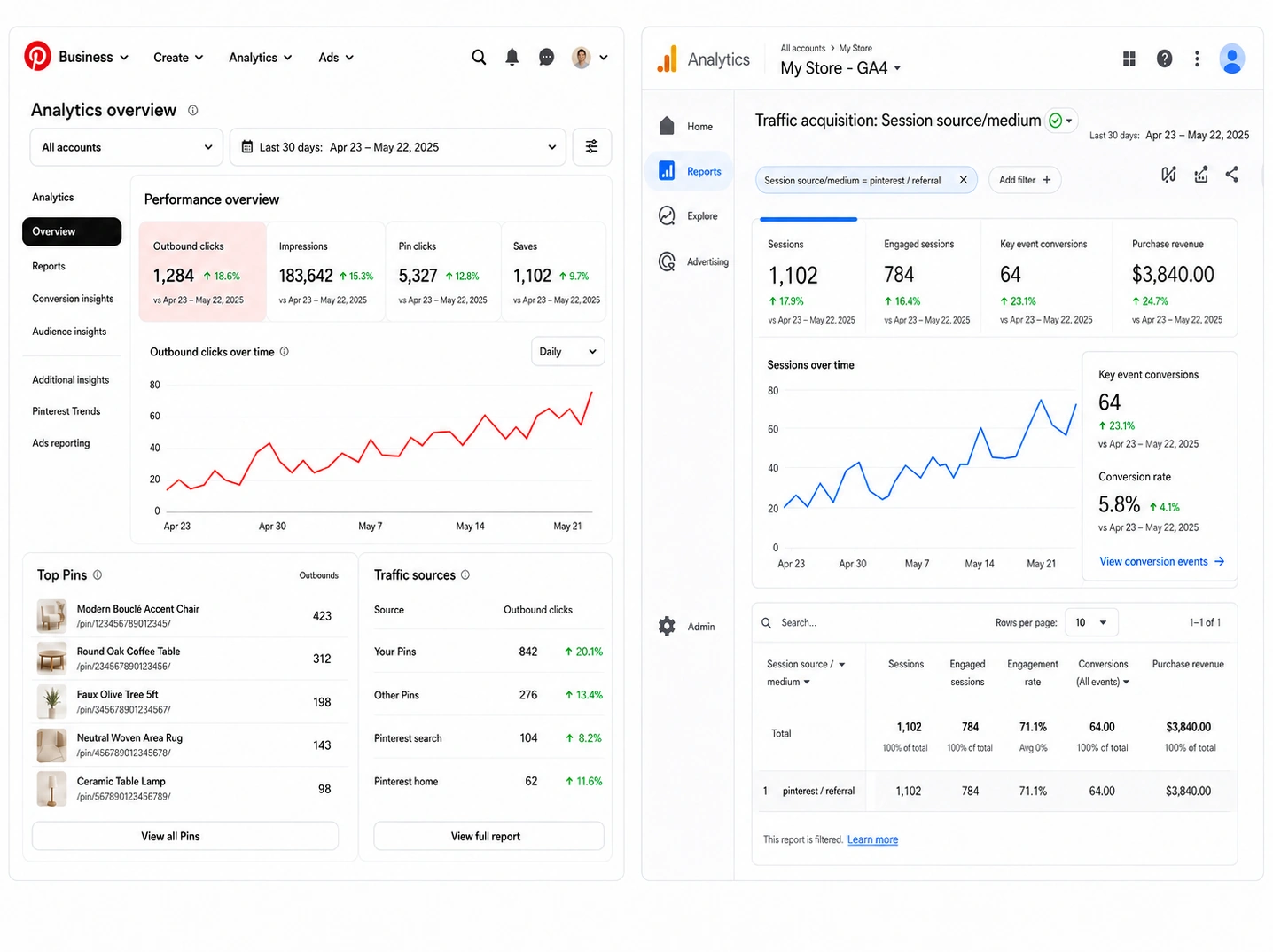
Now the timeline, because expectations are where people self-sabotage. Pinterest is slow on purpose. New pins typically take weeks to gather steam, and the channel often reaches a real stride around the three-to-six-month mark as old pins keep working while new ones pile on top. A jewelry store that pinned consistently for six months grew its Pinterest traffic from 120 to 4,200 monthly visits, with the pins from month one still pulling traffic in month six. By then they had over a thousand pins working at once, each a small trickle that added up.
The lesson is blunt: most people quit at week three, right before it starts. Don't be most people.
Common Pinterest mistakes that cost ecommerce stores traffic
Fast hit list, because these are the ones we see over and over:
- Linking every pin to the homepage instead of a matched page.
- Generic board names ("Our Favorites") that tell the algorithm nothing.
- Skipping Rich Pins, so pins look less trustworthy than competitors'.
- Pinning only bare product photos with no context or text overlay.
- Designing before doing keyword research, so nobody can find the pin.
- Ignoring mobile, where most of your clicks come from.
- Giving up after two or three weeks.
- Running ads before any pin has proven it works organically.
- Never tracking revenue, so you can't tell what's actually selling.
Real ecommerce examples
A few patterns worth modeling. The SaleHoo seller numbers below are founder-reported, and they show the kind of visual, giftable categories Pinterest rewards. (None of these sellers' figures are Pinterest-only; they show category fit and what a focused store can do.)
Fashion. Carolyn runs Bootsie's Boutique, a US women's fashion store doing $50K+ a year, and she's said connecting with SaleHoo was a turning point for her sourcing. Fashion is one of Pinterest's biggest categories, built for outfit boards, seasonal lookbooks, and gift guides. A store like hers would pin "summer wedding guest dresses," "capsule wardrobe basics," and occasion boards. See more in SaleHoo's success stories.
Beauty. Ethan, a US beauty seller, built a roughly $280K-revenue store ($90K profit) largely through organic content, which is the exact muscle Pinterest rewards. Beauty thrives on tutorial pins, ingredient and problem keywords ("non-toxic skincare for sensitive skin"), and routine how-tos that send research-stage shoppers to product pages.
Home and decor. This is Pinterest's heartland. Room-aesthetic boards ("Cozy Minimalist Living Room"), seasonal pins, and collection landing pages do the heavy lifting. The Dubai decor store earlier in this piece is a clean example: same products, smarter board and pin titles, profile visits from 800 to 12,000 in four months.
Illustrative dropshipping workflow. Say you're sourcing a bamboo baby bowl through a vetted supplier. You'd validate demand in Market Insights first, build the three boards from the keyword map earlier, create five pin angles (benefit, gift, how-to, comparison, seasonal), point purchase-ready pins at the product page and "baby-led weaning ideas" pins at a blog post with email capture, then track outbound clicks and double down on the angle that sells. That's the 6-part system, start to finish. (This is an illustrative example, not a specific seller's reported result.)
FAQs
Yes, for visual, planning-led products (fashion, home, beauty, gifts, weddings, food, pets). Less so for commodity or urgent-need items bought purely on price.
Weeks to get moving, and often three to six months to hit a real stride as old pins compound. It's slow then steady, not instant.
Anything you can photograph in context and that people gift, style, or plan around. Think outfits, decor, skincare, kitchen gear, baby products, wedding supplies.
Yes. It's free and unlocks analytics, Rich Pins, the Pinterest tag, and ads. A personal account can't do the ecommerce work.
Yes. Live price and stock data on your pins builds trust and lifts clicks, and once it's set, it's automatic.
Consistency beats bursts. A handful of fresh pins most days, plus rescheduled older pins, works better than 50 pins once a month. See the best times to post on social.
Both, matched to intent. Product pins to product pages, idea and how-to pins to blog posts or collection pages with email capture.
Absolutely, and it's a strong fit for organic, ad-free growth. Validate the product first, then build pins. Start with dropshipping basics if you're new.
Install the Pinterest tag and add UTM tags to your pin links, then watch Pinterest referral conversions in GA4.
Your Pinterest traffic checklist
Work top to bottom and you've got a real channel, not a guess.
- Pick a visual, in-demand, sourceable product, and validate the demand first.
- Set up a Business account, claim your site, connect your catalog, enable Rich Pins, turn on the tag.
- Research buyer-intent keywords and build a keyword map.
- Create intent-based boards with searchable names.
- Make several pin angles per product, vertical, with context and a benefit overlay.
- Match every pin to the right landing page, and add email capture.
- Track outbound clicks and revenue in GA4, then scale your winners with more pins or ads.
Pinterest rewards sellers who pick the right product and stick with it. The product choice is where it's won or lost, and it's the one thing a generic Pinterest guide can't help you with. We can.
Find Pinterest-friendly products and the suppliers to source them. Start your SaleHoo trial.
About this article
About the author


 )